 Compare
.jpg)


The Vodafone 5G Mobile Hotspot (a rebranded ZTE U50 5G) is one of numerous mobile broadband options, many of which support 5G.
Still, its 5G support is arguably a key selling point of the Vodafone 5G Mobile Hotspot, as it means you can enjoy the highest possible data speeds when using it to get your other devices connected to the internet.
Those high speeds coupled with this being a dedicated mobile broadband device make it a safer, faster, and all-round better choice than tethering or using public Wi-Fi – at least if you need to get your gadgets online often when away from home – but is the Vodafone 5G Mobile Hotspot the best mobile broadband choice overall? Read on below to get a clearer idea.
How does the Vodafone 5G Mobile Hotspot work?
Much like most other mobile hotspots, the Vodafone 5G Mobile Hotspot is a small, portable – battery-powered – box that when switched on will broadcast a Wi-Fi network, powered by a SIM card (in this case connecting to the Vodafone network). That Wi-Fi network can then be connected to by any Wi-Fi-enabled gadget you have nearby, allowing things like laptops and tablets to get online when you’re out and about, away from a static Wi-Fi network.
As the Vodafone 5G Mobile Hotspot connects to Vodafone’s network, the Wi-Fi network it broadcasts will offer 5G speeds if you’re in an area with Vodafone 5G. Otherwise, it will offer the highest Vodafone speeds available (which in most cases will be 4G).
.jpg)
With this, you can get up to 32 devices connected to the internet at once, so while it’s primarily designed for travel and holidays, it has the ability to get a whole home or office online if needed, making it viable as a temporary or backup internet solution if for example your home internet goes down.
The tech is similar to tethering from your phone, but with support for so many connections – coupled with not needing to drain your phone’s battery or data allowance – it’s a superior solution if you want to frequently make use of mobile broadband.
It’s also a much better alternative to public Wi-Fi, as this often isn’t very fast, may require you to register or log in, and – in most cases – isn’t very secure. So to keep your device safe from snooping and hacks, and to ensure a smooth, speedy experience, a mobile broadband device like the Vodafone 5G Mobile Hotspot is the way to go.
Setup
The Vodafone 5G Mobile Hotspot is simple to set up, but here’s the step-by-step process.
Step 1: install the SIM card
First, remove the SIM card from the packaging and put this into the Vodafone 5G Mobile Hotspot. To do this, remove the back cover and place the SIM card in the slot there – if the battery arrives installed, you’ll need to remove this too.
Step 2: install the battery
Next, you’ll want to install the battery. To do this, you’ll simply want to place it into its slot above the SIM card slot, then put the back cover back on.
Step 3: switch it on
Next, press the power button on the side to switch the Vodafone 5G Mobile Hotspot on, and wait for it to boot up.
Step 4: get online
The Vodafone 5G Mobile Hotspot should now be broadcasting a Wi-Fi network, which you can connect devices to using the default network name and password. These will be provided on the device label of the Vodafone 5G Mobile Hotspot.
Performance and speeds
The Vodafone 5G Mobile Hotspot supports download speeds of up to 2.6Gbps, so it’s extremely fast, though there’s the same caveat here as with other 5G mobile broadband devices – namely that the UK networks aren’t actually capable of those speeds.
Based on January 2026 data from Opensignal, you can expect average 5G download speeds of around 130.9Mbps on Vodafone, so that’s a lot slower, but still very fast, and in fact faster than many part fibre broadband plans. That said, the very fastest full fibre plans will be significantly faster still.
That Opensignal report also found that Vodafone’s average 5G upload speed was 14.1Mbps, which isn’t great, being beaten here by both Three and EE, though its download speeds were only beaten by Three.
Of course, as this is a rebranded ZTE U50 5G, you could always buy a ZTE U50 5G and put a data-only SIM card from another network in it if you’re not convinced by Vodafone’s speeds, coverage, or plans. It’s also the same device that Three currently sells as the Three 5G MiFi, so that's an option too.
Features
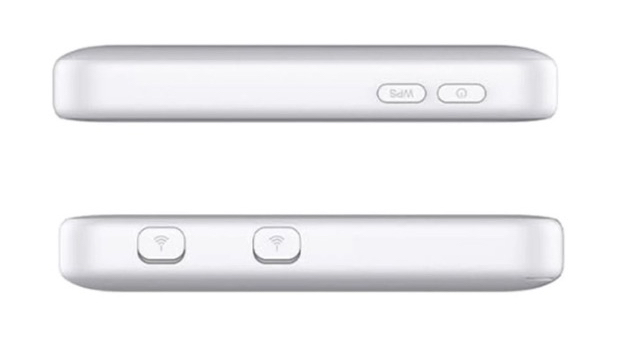
The Vodafone 5G Mobile Hotspot can get up to 32 devices connected to the internet. That’s in line with some rivals but less than others. That said, if you’re using the device as intended (i.e. for portable Wi-Fi) then it should be more than enough, and even for home internet it should have most houses covered.
The Vodafone 5G Mobile Hotspot also supports Wi-Fi 6, and has antenna ports for boosting the signal.
This device packs a 4,500mAh battery, which should offer up to 8 hours of life when the Vodafone 5G Mobile Hotspot is in active use. So that’s the best part of a day’s worth of connectivity until you’ll need to plug it in.
Plans
The Vodafone 5G Mobile Hotspot is available on quite a few different Vodafone plans, with the option for a 30-day plan, a 12-month one, or a 24-month one. All of these plans come with unlimited data, but you can additionally choose whether you want a 100Mbps speed cap or uncapped speeds – with the latter of course costing more.
Prices start at £30 per month with no upfront cost, which gets you the Vodafone 5G Mobile Hotspot on a 24-month contract with unlimited data and 100Mbps speeds. The priciest plan at the time of writing is £40 per month with £29 upfront. That’s for the Vodafone 5G Mobile Hotspot on a 30-day plan with unlimited data and no speed cap.
That makes this cheaper than, for example, the EE 5G WiFi on an unlimited data plan, but more expensive than the Three 5G MiFi, both of which are also 5G mobile broadband devices.
Alternatives
Three 5G MiFi
The Three 5G MiFi is the closest alternative to the Vodafone 5G Mobile Hotspot since it’s actually the same device, so there’s not much more to say about it – other than that Three’s plans are often slightly cheaper.
Netgear Nighthawk M7
The Netgear Nighthawk M7 is another 5G mobile broadband device, and this has a 2.4-inch colour screen. You can purchase this either from O2 or from a store SIM-free, and it supports download speeds of up to 4Gbps and can get up to 32 devices online. It’s a competitive device, so it’s a good choice if you don’t want to be on Vodafone, and O2 also sells the higher end Netgear Nighthawk M7 Pro and the lower end Netgear Nighthawk M3.
EE 5G WiFi
The EE 5G WiFi is EE’s 5G mobile broadband device, and this has the edge in some ways in that it can get over 100 devices online. It also has a larger 6,460mAh battery. However, EE’s current plans all limit you to 100Mbps speeds.
Vodafone 4G Mobile Hotspot
If you don’t need 5G, there’s the Vodafone 4G Mobile Hotspot, which doesn’t offer as high speeds but can still get up to 32 devices connected to the internet, and it’s a lot cheaper.
Vodafone 5G Hub
Perhaps you’re more looking for 5G home broadband than mobile broadband, in which case Vodafone has an option for that too, with the Vodafone 5G Hub. This needs plugging in so it’s less portable, but it’s designed to bring internet to a whole home, with up to 64 simultaneous device connections.
Conclusion
The Vodafone 5G Mobile Hotspot is a great choice if you’re after 5G mobile broadband. It’s competitive with the Three 5G MiFi, and compared to the EE 5G WiFi it has a lower price. Sure, it can’t get as many gadgets online, but its 32 limit should be plenty for most people.
The only real reasons you might not want this are if 5G mobile broadband isn’t the best fit for you – in which case consider 4G mobile broadband, 5G home broadband, or fibre broadband, according to your needs – or if Vodafone doesn’t have the coverage, speeds, or plans you’re looking for.
Of course, in that case you could always buy a ZTE U50 5G, which is the same device, just available from other stores, and therefore on other networks.